

WooCommerce pluginBeta

Your store.
Clean, stocked and secure.

DoiWerk works right inside your WooCommerce store. It finds what’s missing, creates new products from supplier catalogs, checks your security – and makes sure you can install every update without fear. You decide, DOI does the work.

  • Store check
  • Security check
  • Update guard with a way back
  • 7 protection switches
DOI, the DoiWerk assistant
Meet DOI. Your assistant in the store. Explains every finding in one sentence – and only acts with your approval.
01Clean up your storeCheck freeFind and fix missing prices, images, categories and duplicate SKUs. 02Add productsA photo, a spreadsheet or a PDF catalog becomes finished products. 03Check securityFreeFrom inside and outside – with what could happen and how to fix it. 04Safe updatesFreeEvery update gets a ticket back.

01 · Clean up your store

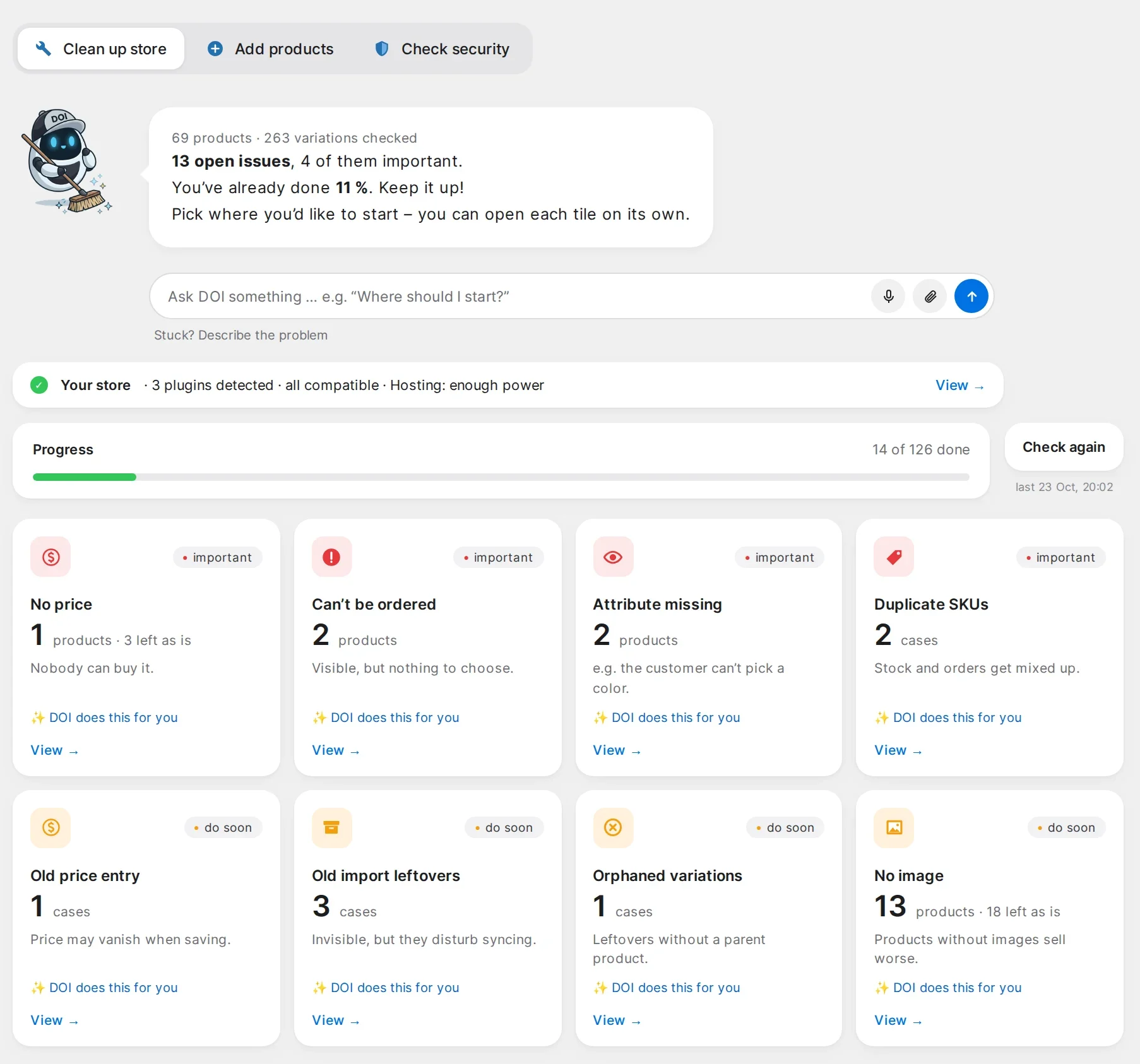
Every loose end at a glance. Each fixed in one click.

DoiWerk reads your store and shows what annoys customers or costs you sales – sorted by importance, not as a technical error list.

  • No price, can’t be ordered, attribute missing – products nobody can buy.
  • Duplicate SKUs, leftovers from old imports – order for stock and supplier sync.
  • Descriptions and categories by DOI – suggestions you review and accept.
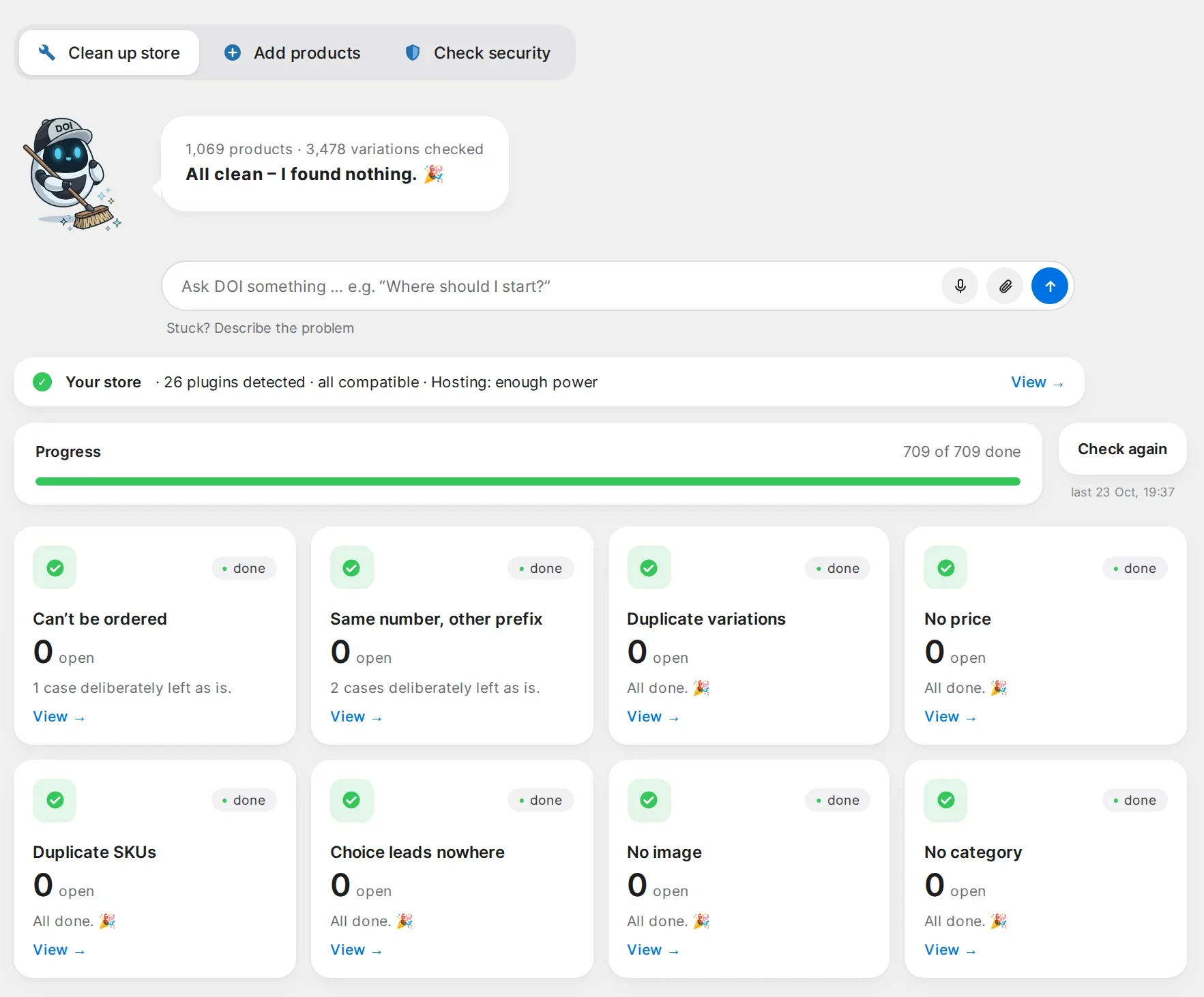
  • Everything backed up – every change can be undone.
BeforeDoiWerk: store clean-up with open issues
After · 1,069 products, 3,478 variationsDoiWerk in a real store: 709 of 709 done, all clean
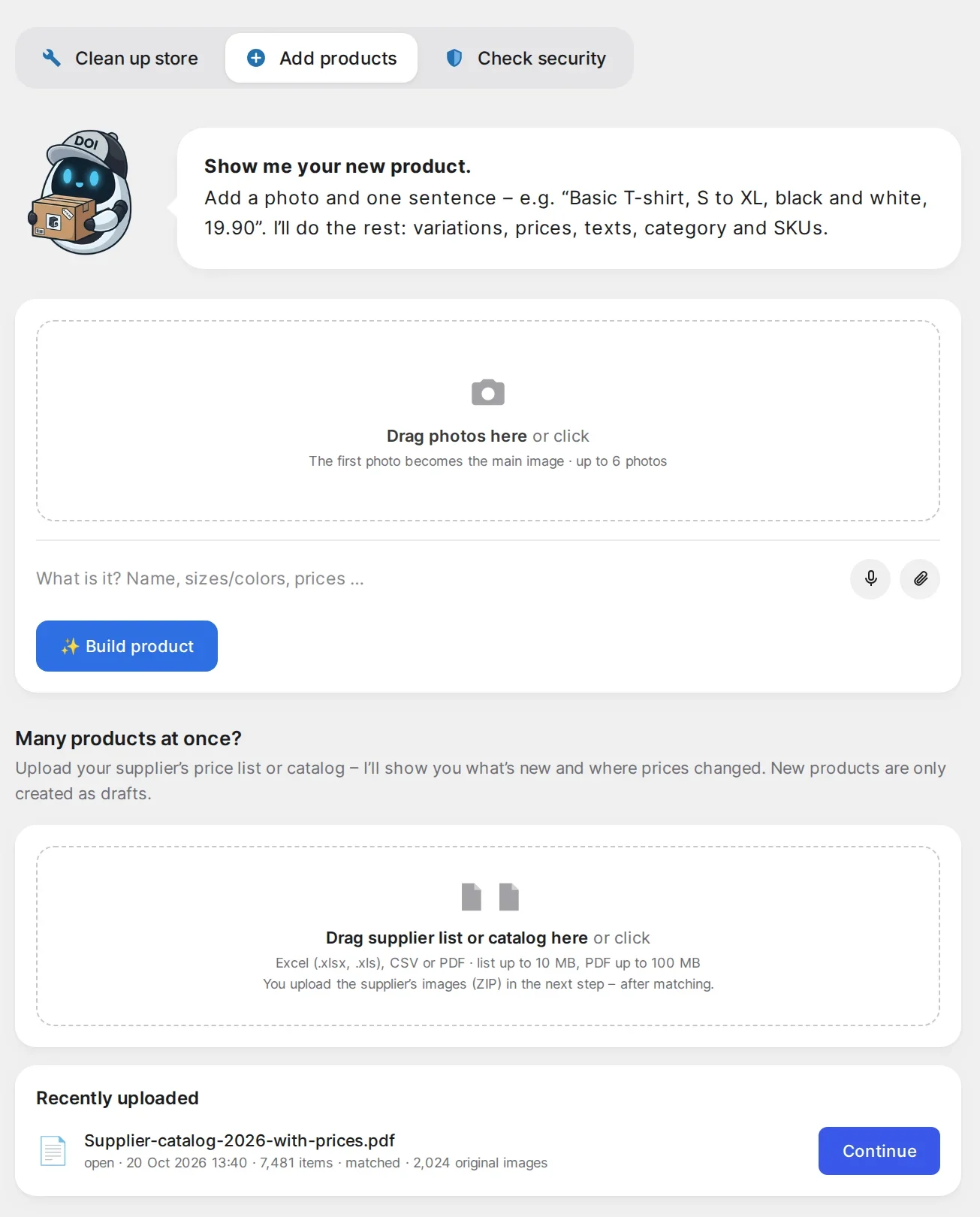
DoiWerk: add products from a photo or a supplier catalog

02 · Add products

Supplier catalog in. Finished products out.

A single product from a photo and one sentence – or your supplier’s complete catalog as PDF, Excel or CSV, plus the image archive as a ZIP.

7,481products read from one PDF catalog
2,437product images matched from 2,024 originals
4,263products ready to import
  • Compared with your store – what’s new, what you already have, where prices changed.
  • Series and variations – sizes, colors and sets become one product with variations.
  • Draft first, then live – you check before customers see anything.
  • In your store’s language – DOI writes names and descriptions in the language your store sells in.

03 · Check security

Checks like an attacker. Explains like a human.

Free Security check with every warning and all 7 protection switches.

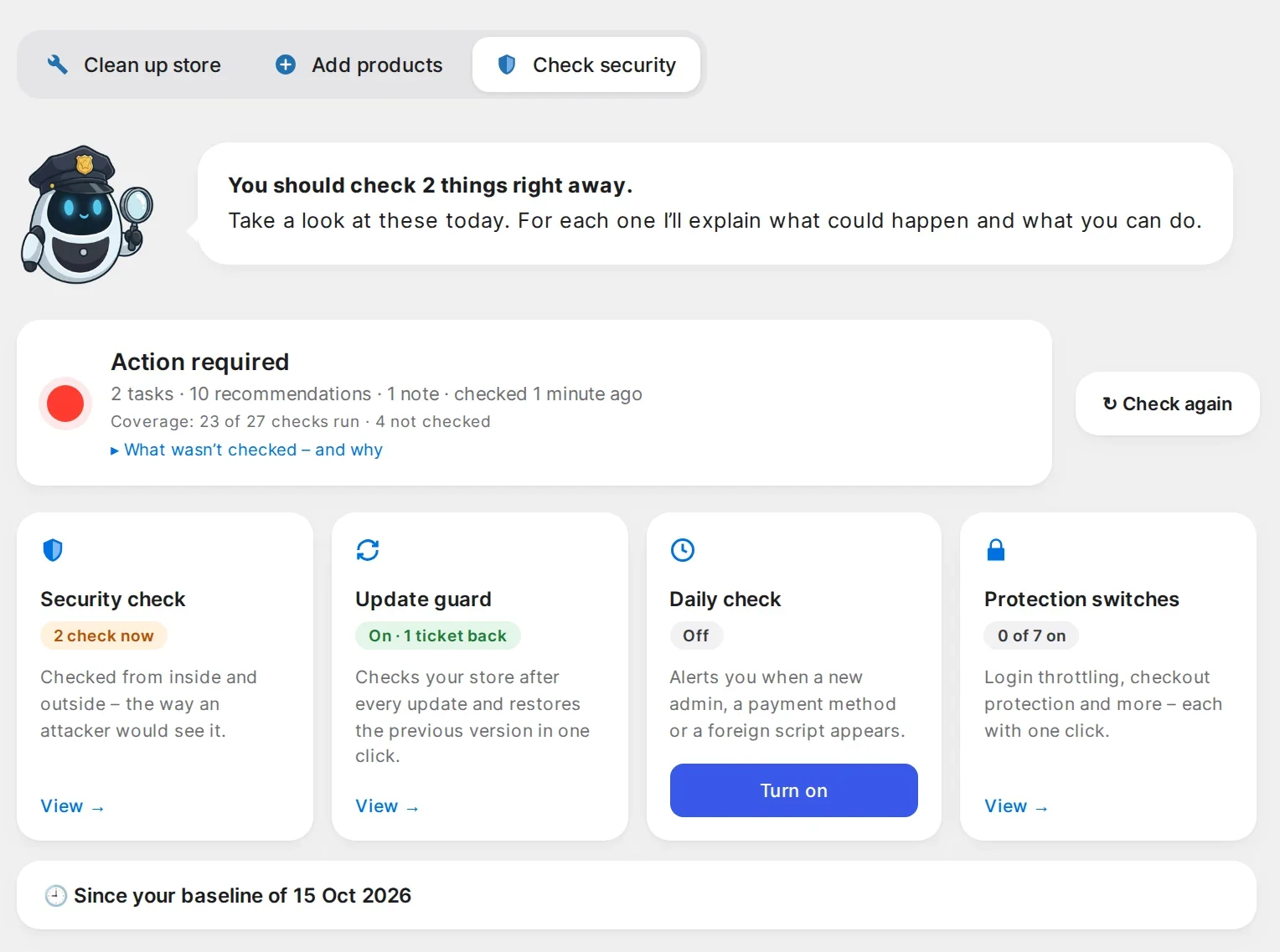
Plugins with known vulnerabilities, new admin accounts, changed payment methods, foreign scripts at checkout – DoiWerk looks from inside and outside and tells you in one sentence what could happen and what to do.

  • Vendor changelogs read for you – if an update closes a hole, you know right away.
  • Quietly every day Pro – an email only when something important changes.

7 protection switches – all free

  • Login throttling
  • Disable file editor
  • Disable XML-RPC
  • Hide login names
  • Block PHP in uploads
  • Protect error log
  • Set security headers
DoiWerk: security check overview

04 · Safe updates

The red update counter loses its terror.

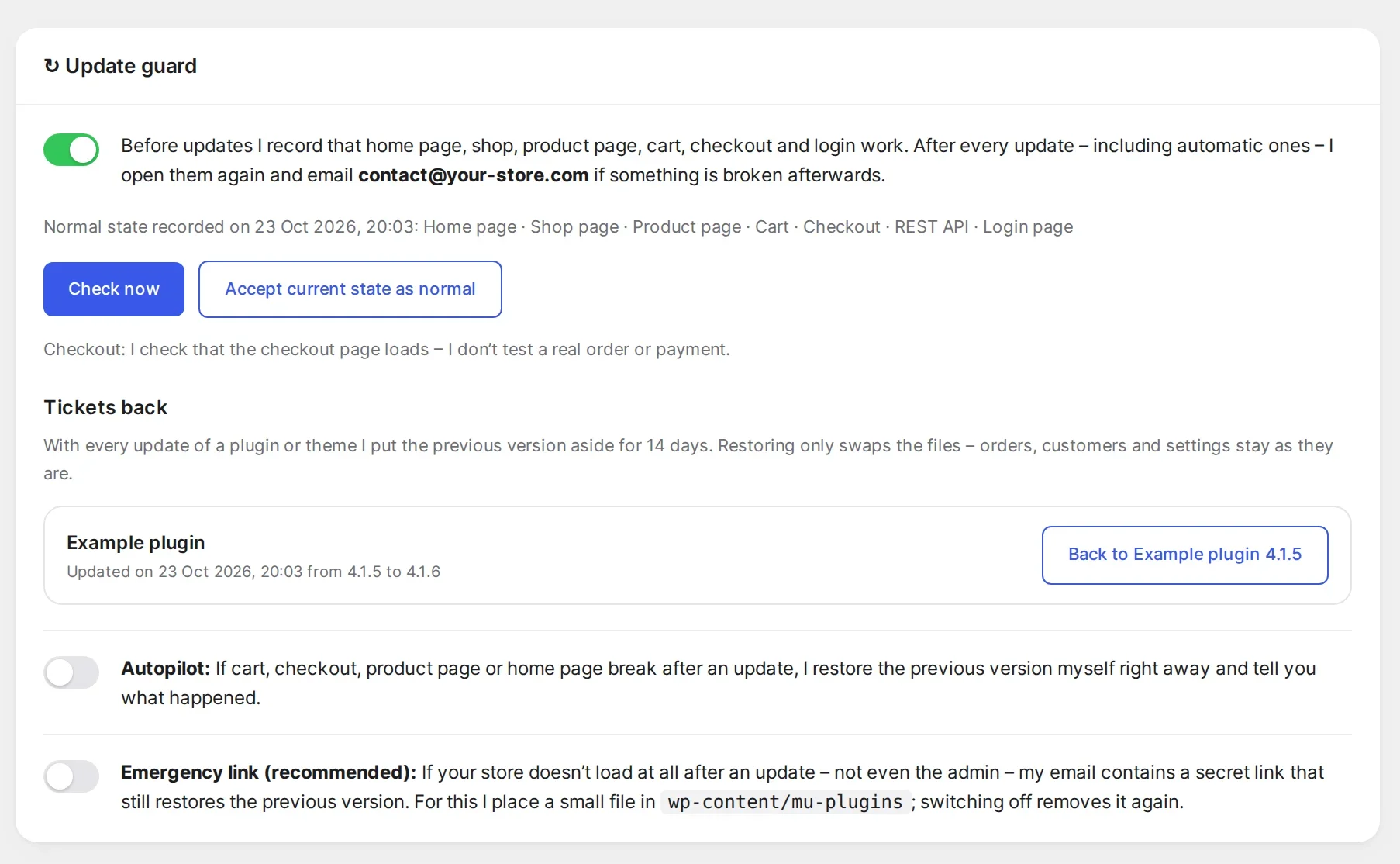
Free Update guard, way back, autopilot and emergency link – forever, no subscription.

Many store owners put off updates for weeks – afraid that checkout will stop working afterwards. DoiWerk takes that fear away.

  1. BeforeDoiWerk records that home page, products, cart and checkout work.
  2. During the updateThe previous version of every plugin and theme is kept for 14 days – your ticket back.
  3. AfterDoiWerk checks everything again. If something broke, you restore the previous version in one click – or autopilot does it right away.

Nothing loads at all after an update? The emergency link in the email still restores the previous version. Orders and customer data are never touched.

DoiWerk update guard with a way back

Everything at a glance

What’s inside the DoiWerk plugin.

Tap any item to see exactly what it does for you.

= free forever

Clean up your store

Finding is free – with the full count and 3 examples per tile. All cases and repairs with Pro.

Products without a price or that can’t be ordered

DoiWerk finds every product customers can see but can’t buy – because the price is missing or a variable product has no purchasable variation. You see each product with the reason. Enter prices right in the list; for variations, DOI adds the missing entries after your approval.

Missing attributes and choices that lead nowhere

If a customer picks “Red” and “XL” and that combination doesn’t exist, they leave. DoiWerk finds these gaps and attributes not enabled for variations – and creates the missing variations or enables the attribute. You see exactly which products are affected first.

Duplicate SKUs and variations

Duplicate SKUs confuse stock, inventory software and supplier sync. DoiWerk shows duplicate SKUs, duplicate variations and identical numbers with different prefixes (e.g. “02-40211” and “40211”). You decide per case which entry stays; DOI assigns a free number to the others.

Old import leftovers and orphaned variations

Earlier imports often leave invisible duplicates and variations without a parent. Customers don’t see them, but they disturb every sync. DoiWerk moves them to the trash in one go – nothing is deleted for good, one click brings everything back.

Assign missing SKUs automatically

DoiWerk recognizes the numbering scheme you already use (e.g. “02-” plus a running number) and assigns matching free SKUs to products and variations without one. Existing SKUs are never overwritten.

Products without an image

Often the image is already in your media library, just not assigned. DoiWerk searches gallery, variation images and file names containing the SKU – safe matches are preselected, uncertain ones you choose yourself. Your own photos on a light background are cut out onto white for free, right inside your store.

Categories and descriptions by DOI

For products without a category, DOI suggests one of your existing categories. For products with no or a very short description, DOI writes a text from the product data, in your store’s language – without invented features. You read each suggestion, edit it or have it rewritten (“shorter”, “more factual”) and accept only what you like.

Unit prices (EU)

In the EU, goods sold by weight, volume or length must show the price per kilo, liter or meter. DoiWerk reads the quantity from the product name – including multipacks like “12 x 100 g” – and enters the unit price. Requires the free plugin “Germanized”, which provides the unit price fields. Stores outside the EU don’t see this check.

Hidden products and drafts

Everything customers don’t see – drafts, private or catalog-hidden products – in one list. Keep what you want; the rest goes to the trash together with its variations. A product and its variations always move together, so no product is ever left without its variations.

Compatibility check for plugins and hosting

When connecting, DoiWerk looks at the plugins your store uses. For special cases like product bundles or multilingual stores, it says honestly what it deliberately leaves alone instead of breaking something. It also checks whether your hosting has enough power for bigger jobs.

Every change backed up and reversible

Before DoiWerk changes anything, it saves the old state. Every action is logged and can be undone in one click. If you edited a product yourself in the meantime, DoiWerk leaves it alone – your change wins.

Add products

Free to try: 3 products from a photo and 1 catalog test run.

New product from a photo and one sentence

Upload up to 6 photos and describe the product in one sentence – typed or spoken, e.g. “Basic T-shirt, S to XL, black and white, 19.90”. DOI creates a finished product: name, description, variations with sizes and colors, prices, category and SKUs. It’s created as a draft; you can have it revised as often as you like and publish it yourself.

Supplier list as Excel, CSV or PDF catalog

Excel and CSV lists up to 10 MB, PDF catalogs up to 100 MB. DoiWerk recognizes the columns itself – SKU, name, price, size, color – and reads PDF catalogs page by page, including tables and prices next to images. No need to rework the list first.

Supplier image archive as ZIP

Upload your supplier’s product images as a ZIP – up to 3 GB, in parts and resumable if the connection drops. DoiWerk matches the images via SKUs in file names, folder names and number ranges. If one image shows a whole series, DoiWerk cuts out the individual products. You choose the background: white or light grey.

Compared with your store

Every item on the list is compared with your store and sorted: new, already there, price changed, probably there (found by name only) or unclear. You see everything on one page with image, name and price. Nothing changes until you click “Apply”.

Columns, pricing rule and categories

If the list has purchase prices, you set how your selling price is calculated. For new products, DoiWerk suggests categories from your existing ones and readable product names. Everything can be changed per product or for all at once.

Series, sets and variations

Identical items in several sizes or colors become one product with variations – using the attribute names your store already has (e.g. “Size” instead of a new “Height”). Everything fits your existing filters and products.

New products as drafts first

Nothing goes live unchecked. New products arrive as drafts in WooCommerce; you review and publish. Price changes on existing products are applied all at once or one by one.

AI scene images

Your real product photo becomes images with a fitting background – on a table or at an award ceremony, for example. The product itself stays your original photo; the AI only paints the surroundings. DoiWerk checks first whether the photo is suitable; images where the product looks altered are discarded and not charged.

Check security

Checked from inside and outside

Inside: plugins, themes, WordPress version, admin accounts, access and settings. Outside: the way an attacker sees your store – encryption, certificate, open interfaces, visible login names. Every finding comes with one sentence on what could happen and how to fix it.

Known vulnerabilities and vendor changelogs

DoiWerk compares your plugin versions with known vulnerabilities and reads the vendors’ changelogs. If a changelog says an update closes a hole, you see it at the top right away – even before it’s in a database.

New admins, payment methods and checkout scripts

After the first check, DoiWerk remembers the state. If a new administrator appears, a payment method or bank account changes, or a foreign script suddenly runs at checkout, DoiWerk shows exactly that change – the typical traces of attacks on stores.

Modified WordPress files and PHP in uploads

DoiWerk compares WordPress files with the official checksums and looks for program files in the uploads folder, where they don’t belong.

Quarantine for suspicious files

Move suspicious files into a locked quarantine with one click instead of deleting them. If a file turns out to be harmless, restore it just as easily.

Daily check with email Pro

If you like, DoiWerk checks quietly every day and only emails you when something important has changed. No email means: nothing new.

7 protection switches

Login throttling (15-minute pause after 5 failed attempts), disable the admin file editor, disable XML-RPC, hide login names, block PHP in uploads, protect the error log, set security headers. Only you flip a switch – with your name in the log. Right after switching on, DoiWerk checks that home page, login and cart still respond.

Honestly: what the check is not

DoiWerk is not a firewall or virus scanner and doesn’t check the server itself. A check is a snapshot, not a guarantee. For real-time protection we recommend adding a firewall such as Wordfence – the two get along fine.

Safe updates

Record the normal state

DoiWerk regularly opens home page, shop page, a product, cart, checkout, login page and API and remembers that everything works – including the add-to-cart button and forms.

Check after every update

After every update – manual or automatic overnight – DoiWerk opens the same pages again. Several updates in a row are checked together once things settle. Every error is confirmed a second time before you’re notified – no false alarms from short maintenance windows.

A ticket back for every plugin and theme

With every update, DoiWerk keeps the previous version for 14 days – automatically, for every plugin and theme, from any vendor. Nothing to select in advance.

Restore in one click

If something is broken after an update, a red notice in the admin offers “Back to version …”. One click swaps the files back, the plugin stays active, and DoiWerk checks again. Orders and customer data stay untouched because the database is deliberately not rolled back.

Autopilot

Turn it on and DoiWerk restores the previous version by itself if cart, checkout, product page or home page stop working after an update – and emails you what happened. Automatic updates for that plugin are paused so the faulty version doesn’t return overnight.

Emergency link

If nothing loads after an update, not even the admin, the warning email contains a secret link. It still works because a small emergency file starts before all other plugins; it can be used once and expires after 72 hours.

DOI, your assistant

Questions about your own store

Ask DOI in plain words – typed or spoken: “Where do I start?”, “Why can’t this product be ordered?”. DOI answers with your store’s real data and says when it doesn’t know.

Every finding in one sentence

No jargon, no error codes: DOI explains what a finding means, what could happen and what to do now.

Report a problem right from the plugin

Below every input there’s “Stuck? Describe the problem”. Your report reaches us directly – with the technical details we need to help, without customer or order data.

Pricing

Seeing is free. You pay for what DOI does for you.

Every item expands – so you know exactly what you get.

Free

€0forever

Know where your store stands – and update safely.

Complete store check

All findings in all areas with the full count – and 3 affected products per tile with link and explanation, so you can get started yourself. Run the check as often as you like.

Security check

The full inside and outside check with all critical warnings. We never hide security risks behind a paywall.

Update guard with a way back

After every update DoiWerk checks your store and tells you if something broke – with the plugin that probably caused it. The previous version of every plugin and theme is kept for 14 days and you restore it in one click. Free.

Autopilot and emergency link

If you want, DoiWerk restores the previous version by itself as soon as cart, checkout or home page break after an update. And if nothing loads at all, the emergency link in the email still brings it back. Free.

7 protection switches

Login throttling, checkout protection, security headers and more – each on and off in one click. Free.

3 products from photos

Create a complete product from photos and one sentence three times – with variations, prices, texts and category. Each is created as a draft and can be revised as often as you like before you publish.

1 catalog test run

Upload a supplier list. For Excel or CSV, DoiWerk compares the complete list with your store and shows every result: new, existing, price changed. For a PDF catalog, DoiWerk reads the first 20 pages. Import up to 50 products as drafts – and see on your own catalog how well it works.

Download free
Subscription

DoiWerk Pro

€24per month · or €240 per year (2 months free) · plus VAT where applicable

Everything in Free – and DOI does the work.

One-click fixes

You see every affected product in each tile, and instead of fixing each finding yourself in WooCommerce, DOI handles it after your approval: enter prices, create variations, assign SKUs, clean up leftovers – backed up and reversible.

Daily security check

DoiWerk checks your store every day for new vulnerabilities in your plugins and themes and emails you as soon as something new shows up.

300 DOI texts and categories per month

Each suggested description or category counts once. Having a suggestion rewritten to your wishes doesn’t count. Unused texts expire at the end of the month.

50 products from photos per month

Each created product counts once – no matter how many variations it has or how often you have it revised.

Ongoing price sync

When your supplier sends a new price list, upload it and DoiWerk shows every price change compared with your store. Up to 500 items per month are included – enough for ongoing upkeep. For whole catalogs with new products there’s the catalog import.

Start free Unlock Pro afterwards inside the plugin – for exactly this store. Cancel monthly. What DOI created stays in your store.

One-time add-ons

from €9no subscription, plus VAT where applicable

For the big jobs.

Catalog import up to 1,000 items€49

Pay once and fully process one supplier list or PDF catalog with up to 1,000 items. Same as “up to 10,000 items”, just for smaller catalogs.

Catalog import up to 10,000 items€149
What you get: DoiWerk fully processes a supplier list or PDF catalog with up to 10,000 items – no subscription.
  • File reading: Excel or CSV up to 10 MB, PDF up to 100 MB, page by page
  • Match supplier images from a ZIP up to 3 GB, cut series images into single images
  • Comparison with your store: new, existing, price changed, to review
  • Variations and series with your store’s attributes, category and name suggestions, your pricing rule
  • Import as drafts – in as many steps as you like
  • 60 days for this catalog; an updated version of the same catalog within that time is included
What counts as an item? Every row with its own SKU. A series in 3 sizes is 3 items.
Not included: AI scene images (image pack) and review by us.
50 scene images€9

50 images with an AI background from your real product photos. Only delivered images count: if a photo isn’t suitable or an image is discarded, it isn’t deducted. The pack doesn’t expire.

Start free You buy inside the plugin when you need it – e.g. right after the catalog test run.

For businesses only. Prices in euros. VAT: German businesses pay 19 %; EU businesses with a VAT ID are invoiced under the reverse charge; businesses outside the EU pay no German VAT. Your bank converts to your currency.

Beta stores wanted

Help us make DoiWerk better.

Anyone can download, install and see the store check – free and without signing up. For the beta we’re also looking for WooCommerce stores that use DoiWerk day to day and tell us honestly what works and what needs to get better.

We learn the most from stores with more than 500 products – large catalogs show what DoiWerk can do. As a beta store you work directly with us and get new features first. Registration is free; we’ll get back to you personally.

We only use your details for this request. More in our privacy policy.

Getting started

First results in five minutes.

01

Install the plugin

Download for free, then upload and activate it like any WordPress plugin.

02

Connect your store

One click. DoiWerk doesn’t change anything while connecting.

03

See your first check

DOI shows you where to start.

What DoiWerk does

  • Shows suggestions before anything changes
  • Backs up every change and keeps it reversible
  • Checks after every update and can restore
  • Explains clearly instead of using jargon

What DoiWerk doesn’t do

  • Change or delete products without your approval
  • Replace a firewall or virus scanner
  • Test orders or payments
  • Roll back the database during an update

FAQ

Before you ask.

Does DoiWerk change anything without me?

No. DoiWerk shows suggestions, you approve. The only exception is the update guard’s autopilot – you turn it on yourself, and it only restores a plugin’s previous version if cart, checkout or home page break afterwards.

What happens to my customer data and orders?

DoiWerk needs product and store data for its work. Customer data and orders are never transferred.

Does it work with my theme and plugins?

When connecting, DoiWerk checks what’s in your store and says honestly what it can safely edit – and what it deliberately leaves alone, such as bundles or multilingual stores.

Is the plugin available in English?

The English plugin interface is on its way. DOI already writes product names and descriptions in your store’s language. During the beta, some screens are still in German.

What does DoiWerk cost?

The store check, security check, update guard with way back, autopilot, emergency link and all protection switches are free forever. The store check shows every finding with the full count and 3 examples per tile; all cases and repairs come with Pro. DoiWerk Pro costs €24 per month (€240 per year) and does the work. Large catalog imports are available once from €49. What DOI created stays in your store after you cancel.